
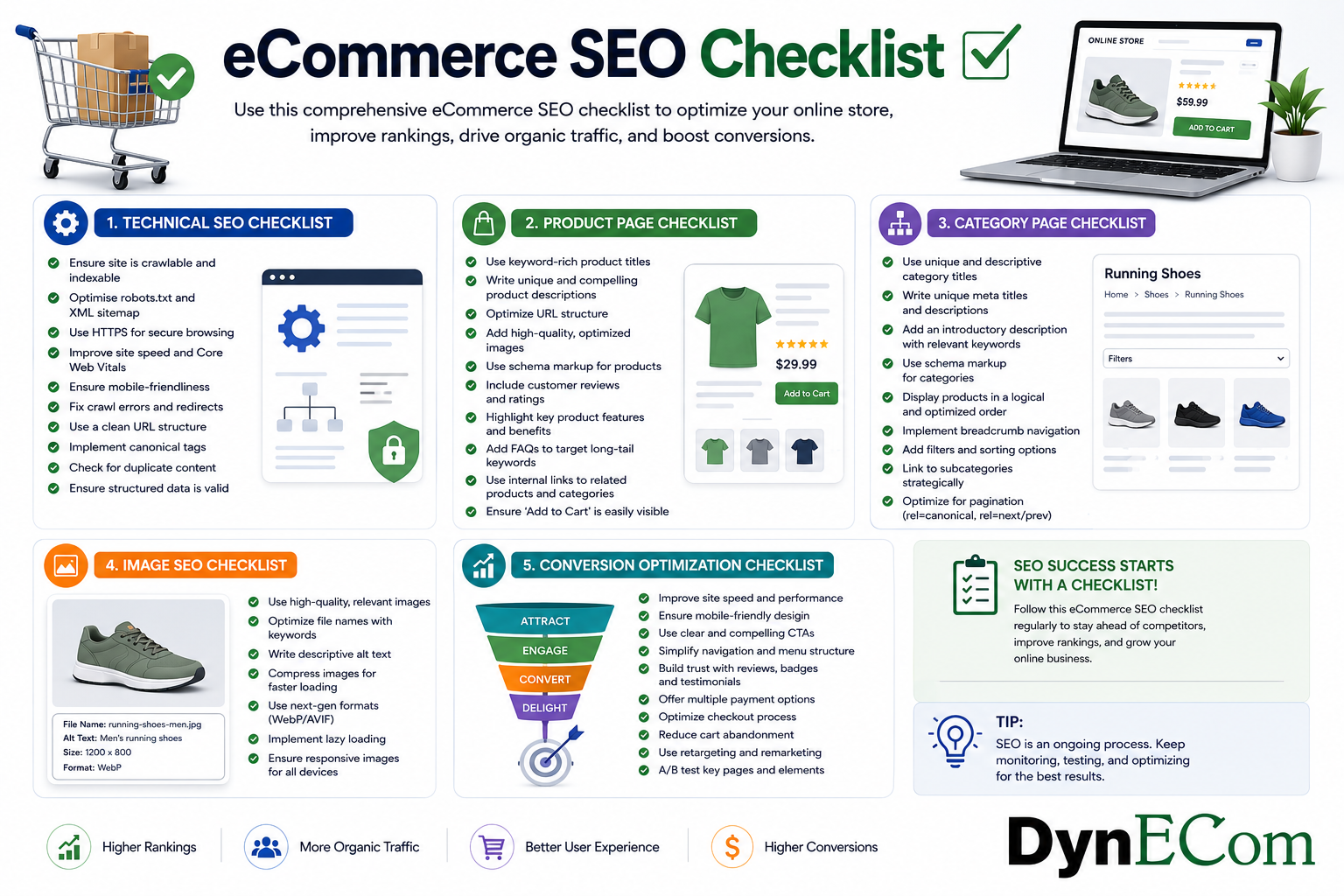
Why You Need an eCommerce SEO Checklist
Running an online store involves managing hundreds or even thousands of moving parts — products, categories, images, content, technical performance, and customer experience. While adding new products and running advertising campaigns can generate short-term sales, long-term growth requires a strong organic foundation.
An effective eCommerce SEO checklist helps brands systematically optimize every important area of their online store to improve search visibility, attract qualified shoppers, and increase conversions.
Whether you operate a:
- Shopify store
- WooCommerce website
- Magento store
- Amazon storefront
- Walmart Marketplace account
- Multi-channel eCommerce business
this checklist provides a practical framework to improve organic performance.
A successful eCommerce SEO strategy focuses on five major areas:
- Technical SEO
- Product page optimization
- Category page optimization
- Image SEO
- Conversion optimization
What Is an eCommerce SEO Checklist?
An eCommerce SEO checklist is a structured list of optimization tasks designed to improve an online store’s ability to rank in search engines and convert visitors into customers.
Unlike traditional websites, eCommerce stores have unique SEO challenges:
- Hundreds of product pages
- Duplicate content issues
- Complex site architecture
- Product variations
- Filtering and sorting pages
- Large image libraries
- Inventory changes
A proper checklist ensures that important SEO elements are not overlooked.
Complete eCommerce SEO Checklist
Section 1: Technical SEO Checklist
Technical SEO creates the foundation for search engine visibility. If search engines cannot properly crawl and understand your website, even excellent content may struggle to rank.
Website Crawlability
Checklist:
- Submit XML sitemap to search engines
- Ensure important pages are indexable
- Fix broken links (404 errors)
- Remove unnecessary indexed pages
- Optimize robots.txt file
- Check crawl errors regularly
Example:
An online store with 20,000 products may accidentally index thousands of filtered pages:
/chairs?color=black
/chairs?color=blue
/chairs?size=large
This can create duplicate content issues.
Improve Website Speed
Page speed impacts both rankings and conversions.
Checklist:
- Compress images
- Use WebP image format
- Minimize JavaScript and CSS files
- Enable browser caching
- Improve server response time
- Use a content delivery network (CDN)
Why it matters:
A slow website can result in:
- Higher bounce rates
- Lower rankings
- Lost sales
Example:
A customer searching for running shoes may leave a slow website and purchase from a competitor instead.
Mobile Optimization
Mobile commerce continues to grow, making mobile SEO essential.
Checklist:
- Responsive website design
- Mobile-friendly navigation
- Easy product browsing
- Fast mobile loading speed
- Simple checkout process
Google primarily evaluates mobile versions of websites, making mobile optimization a ranking priority.
URL Optimization
SEO-friendly URLs help users and search engines understand page topics.
Bad:
example.com/product?id=12345example.com/ergonomic-office-chairChecklist:
- Use descriptive URLs
- Include relevant keywords
- Avoid unnecessary parameters
- Keep URLs short
- Use hyphens instead of underscores
Section 2: Product Page SEO Checklist
Product pages are the most valuable pages on an eCommerce website because they directly influence sales.
A well-optimized product page improves:
- Search rankings
- Click-through rate
- Conversion rate
Product Title Optimization
Checklist:
☐ Include primary keyword
☐ Include product type
☐ Include important attributes
☐ Include brand name where relevant
☐ Avoid keyword stuffing
Example:
Weak:
Premium Chair
Optimized:
Ergonomic Office Chair with Adjustable Lumbar Support and Mesh Back
Product Description Optimization
A strong product description should answer:
- What is the product?
- Who is it designed for?
- What problem does it solve?
- Why should customers buy it?
Checklist:
- Write unique descriptions
- Include keywords naturally
- Highlight benefits
- Explain features clearly
- Add specifications
- Answer common customer questions
Avoid:
Copying manufacturer descriptions used by hundreds of websites.
Product Reviews Optimization
Reviews influence both rankings and purchase decisions.
Checklist:
- Collect customer reviews
- Encourage photo reviews
- Display ratings clearly
- Respond to customer feedback
- Monitor negative reviews
Example:
A product with:
⭐ 4.8 rating
500 reviews
will usually attract more clicks than:
⭐ 3.5 rating
20 reviews
Product Schema Markup
Checklist:
- Add Product schema
- Add price information
- Add availability status
- Add review ratings
- Add brand information
Schema helps search engines understand product details and can improve search appearance.
Section 3: Category Page SEO Checklist
Category pages often target high-volume keywords and help shoppers discover products.
Examples:
- Running Shoes
- Office Furniture
- Beauty Products
- Home Appliances
Category Keyword Optimization
Checklist:
- Research category keywords
- Optimize category title
- Add keyword-rich descriptions
- Create logical categories
- Avoid overly broad categories
Example:
Weak:
Chairs
Better:
Ergonomic Office Chairs for Home and Business
Category Page Content
Many stores leave category pages with only product grids.
A strong category page should include:
- Category introduction
- Buying guidance
- Product comparisons
- FAQs
- Internal links
Example:
A mattress category page can include:
- Mattress buying guide
- Mattress size comparison
- Sleep recommendations
Category Navigation
Checklist:
- Use clear menus
- Add breadcrumbs
- Create logical hierarchy
- Link related categories
Example:
Home
 ↓
Furniture
 ↓
Office Furniture
 ↓
Office Chairs
 ↓
Ergonomic Chairs
Section 4: Image SEO Checklist
Images play a major role in eCommerce because customers cannot physically touch products before purchasing.
Optimized images improve:
- Search visibility
- User experience
- Conversion rates
Image Optimization
Checklist:
- Use high-quality product images
- Compress images
- Use descriptive filenames
- Add alt text
- Use multiple product angles
- Add lifestyle images
Example:
Poor filename:
IMG_12345.jpgOptimized:
black-leather-office-chair.jpgProduct Image Best Practices
Include:
- Main product image
- Lifestyle image
- Size comparison image
- Feature highlights
- Packaging image
- Product usage demonstration
Example:
A furniture brand can improve conversions by showing:
- Chair dimensions
- Room placement
- Material details
Section 5: Conversion Optimization Checklist
SEO brings visitors, but conversion optimization turns visitors into customers.
Improve Product Experience
Checklist:
- Clear pricing
- Visible availability
- Strong call-to-action buttons
- Easy navigation
- Shipping information
- Return policy visibility
Improve Trust Signals
Customers need confidence before purchasing.
Checklist:
- Customer reviews
- Ratings
- Warranty information
- Secure checkout badges
- Customer testimonials
Optimize Checkout Experience
Checklist:
- Reduce checkout steps
- Offer multiple payment options
- Remove unnecessary fields
- Optimize mobile checkout
Improve Internal Linking
Internal links help distribute SEO value throughout your website.
Checklist:
- Link categories to products
- Link blogs to products
- Add related product recommendations
- Avoid orphan pages
Example:
Blog:
“Best Office Chairs for Remote Work”
Links to:
- Ergonomic chairs
- Executive chairs
- Budget chairs
Advanced eCommerce SEO Checklist
| Area | Task |
|---|---|
| Technical SEO | Fix crawl errors |
| Site Speed | Improve loading performance |
| Mobile SEO | Optimize mobile experience |
| Product SEO | Optimize titles and descriptions |
| Category SEO | Build keyword-focused collections |
| Images | Optimize filenames and alt text |
| Schema | Add product structured data |
| Reviews | Improve ratings and trust |
| Content | Publish buying guides |
| Internal Links | Connect relevant pages |
eCommerce SEO Audit Checklist (Quick Version)
Before launching an SEO campaign, check:
Technical
- Website indexed correctly
- Sitemap submitted
- Mobile-friendly
- Fast loading speed
- No broken links
Products
- Optimized titles
- Unique descriptions
- High-quality images
- Reviews collected
- Schema implemented
Categories
- Keyword optimized
- Useful descriptions
- Proper navigation
- Internal links added
Conversion
- Clear pricing
- Easy checkout
- Trust signals
- Strong product visuals
Final Thoughts
A strong eCommerce SEO checklist provides a repeatable framework for improving online store performance.
SEO success does not come from optimizing only one area. The highest-performing eCommerce brands combine:
- Strong technical foundations
- Optimized product pages
- Search-friendly category structures
- High-quality images
- Conversion-focused experiences
- Helpful content strategies
By following this checklist consistently, brands can improve rankings, attract more qualified customers, reduce dependency on paid advertising, and build sustainable long-term growth.
The goal of eCommerce SEO is not just to rank higher — it is to connect shoppers with the products they are actively searching for and turn organic visibility into measurable revenue.
This article covers just one aspect of eCommerce SEO. If you’re looking for a complete roadmap—from keyword research and technical SEO to AI-powered search optimization, Amazon SEO, Walmart SEO, Shopify SEO, and conversion optimization—check out our Ultimate eCommerce SEO & GEO Guide for 2026.

Dharmendra Tripathi is a Senior Digital Marketing & Customer Success leader with deep expertise in eCommerce SEO, performance marketing, and marketplace growth. With years of experience managing SEO and advertising campaigns across Google, Meta, Amazon, Walmart, and Shopify, he helps brands improve search visibility, maximize advertising ROI, and accelerate online sales. Passionate about AI-powered search, content optimization, and analytics, Dharmendra regularly shares actionable insights to help eCommerce businesses stay ahead in an evolving digital landscape.