
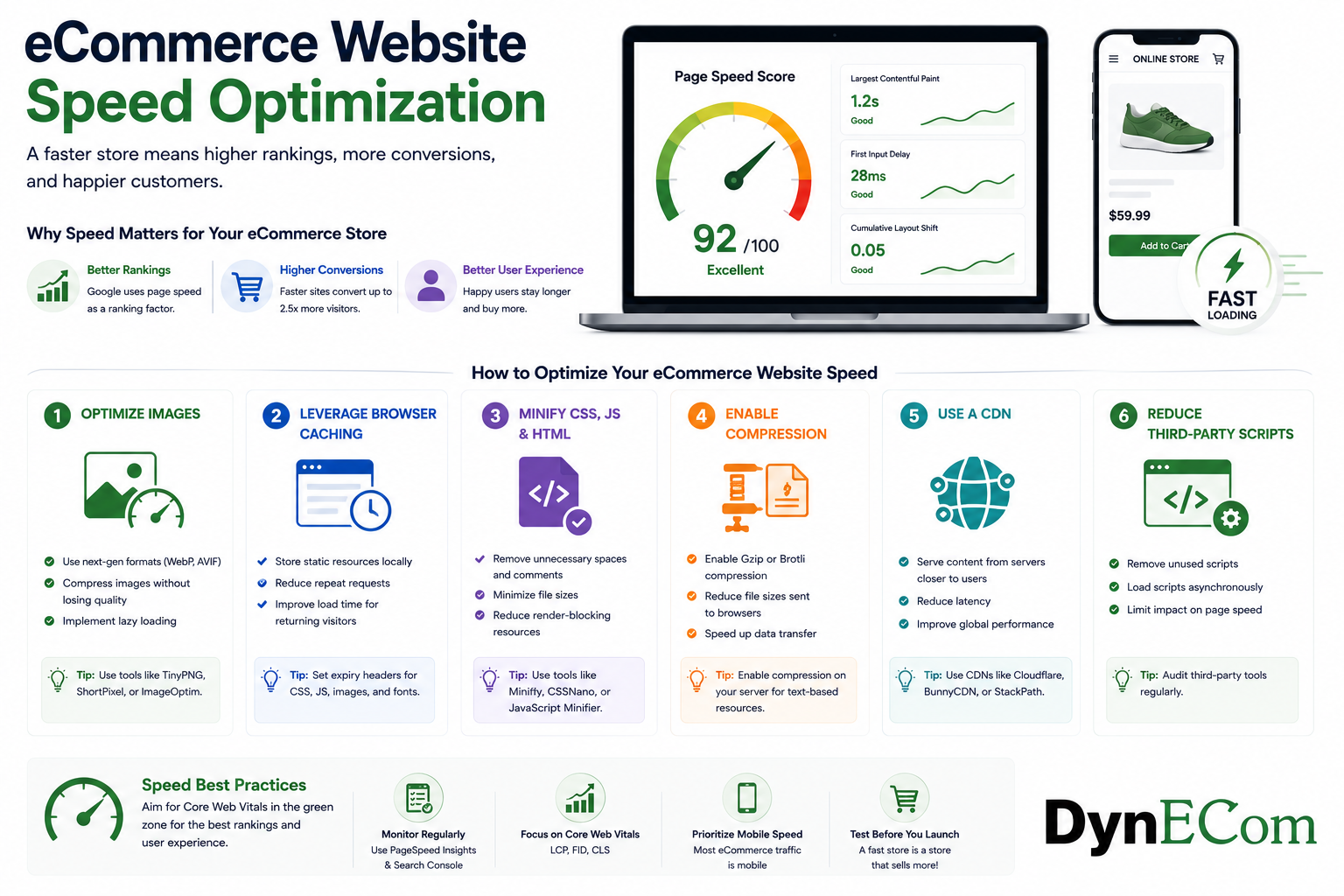
Why eCommerce Website Speed Matters
In the competitive world of online shopping, every second matters.
Customers expect websites to load quickly, product pages to appear instantly, and checkout experiences to be smooth. A slow eCommerce website can result in frustrated shoppers, abandoned carts, lower rankings, and lost revenue.
This is why eCommerce website speed optimization has become a critical part of technical SEO and online growth.
eCommerce website speed optimization is the process of improving an online store’s loading speed, performance, and responsiveness to provide a better experience for users and search engines.
Website speed directly impacts:
- Search engine rankings
- Conversion rates
- User experience
- Customer retention
- Revenue performance
Whether you operate a Shopify store, WooCommerce website, Magento platform, Amazon brand store, or DTC website, improving website speed can create measurable business impact.
What Is eCommerce Website Speed Optimization?
eCommerce website speed optimization involves improving the technical performance of an online store so that pages load faster and customers can browse, search, and purchase products efficiently.
It includes optimizing:
- Product images
- Website code
- Server performance
- Mobile experience
- Browser caching
- Third-party scripts
- Content delivery networks (CDNs)
The goal is simple:
Make every page load faster while maintaining a high-quality shopping experience.
Why Website Speed Is Important for eCommerce SEO
1. Speed Impacts Search Rankings
Search engines prioritize websites that provide better user experiences.
Google considers performance signals such as:
- Page loading speed
- Mobile usability
- Core Web Vitals
- User interaction experience
A slow website may struggle to compete against faster competitors with similar content and products.
Example:
Two online stores sell the same product:
Store A:
- Loads in 2 seconds
- Mobile optimized
Store B:
- Loads in 7 seconds
- Poor mobile experience
Store A has a stronger chance of delivering better user signals.
2. Speed Directly Impacts Conversion Rate
Website visitors expect fast experiences.
A delay of even a few seconds can impact purchasing decisions.
Example:
A customer clicks a Google result for:
“Wireless headphones under $100”
If the product page takes too long to load, the customer may:
- Return to search results
- Visit a competitor
- Abandon the purchase
Faster websites create smoother buying journeys.
3. Improves User Experience
Website speed affects every stage of shopping:
Browsing
Customers can quickly explore products.
Product Discovery
Search and filtering work faster.
Checkout
Customers complete purchases with fewer interruptions.
A fast website creates confidence and trust.
Understanding Core Web Vitals for eCommerce Websites
Google introduced Core Web Vitals to measure real user experience.
The three main metrics are:
1. Largest Contentful Paint (LCP)
What It Measures:
How quickly the main content loads.
Examples:
- Product image
- Hero banner
- Main product information
Recommended:
LCP should be under 2.5 seconds
2. Interaction to Next Paint (INP)
What It Measures:
How quickly a page responds after user interaction.
Examples:
- Clicking “Add to Cart”
- Opening filters
- Selecting product variations
A slow response creates frustration.
3. Cumulative Layout Shift (CLS)
What It Measures:
How stable the page layout is.
Example:
A customer tries clicking:
Add to Cart
but the button moves because an image loads.
This creates a poor experience.
Common Causes of Slow eCommerce Websites
1. Large Product Images
Product images are essential for conversions, but they are often the biggest performance problem.
Common issues:
- Large file sizes
- Uncompressed images
- Incorrect dimensions
Example:
A product image:
Before:
5 MB JPG
After optimization:
200 KB WebP image
The customer sees the same quality with faster loading.
Image Optimization Best Practices
- Compress images before uploading
- Use WebP or AVIF formats
- Resize images correctly
- Use lazy loading
- Add descriptive filenames
Example:
Poor:
IMG_45892.jpgBetter:
black-leather-office-chair.jpg2. Too Many Apps and Plugins
Many eCommerce stores install multiple tools:
- Reviews apps
- Chat widgets
- Analytics tools
- Pop-ups
- Marketing scripts
Each adds additional code.
Example:
A Shopify store using 25 apps may load unnecessary scripts on every page.
Optimization Tips:
- Remove unused apps
- Load scripts only where needed
- Review third-party integrations
- Reduce unnecessary tracking codes
3. Poor Hosting Performance
Hosting affects:
- Server response time
- Website availability
- Page speed
Large eCommerce websites need infrastructure that can handle:
- Traffic spikes
- Large catalogs
- Multiple users
Hosting Optimization:
Consider:
- Dedicated resources
- Cloud hosting
- CDN integration
- Database optimization
4. Unoptimized JavaScript and CSS
Large amounts of code slow down websites.
Common causes:
- Unused CSS
- Heavy JavaScript libraries
- Multiple scripts loading simultaneously
Solutions:
- Minify CSS and JavaScript
- Remove unused code
- Delay non-critical scripts
- Load important content first
5. Poor Mobile Performance
Mobile shoppers often use slower networks compared to desktop users.
A website that works well on desktop may still perform poorly on mobile.
Mobile Speed Optimization Checklist:
- Responsive design
- Optimized images
- Simple navigation
- Fast checkout
- Lightweight pages
eCommerce Website Speed Optimization Strategies
1. Optimize Product Pages
Product pages are the most important pages in eCommerce.
Optimize:
- Product images
- Product videos
- Reviews
- Related products
- Scripts
Example:
A product page with:
- 12 high-resolution images
- 3 videos
- Multiple tracking scripts
may become slow.
Prioritize:
- Main product image
- Essential information
- Customer reviews
2. Use Content Delivery Networks (CDNs)
A CDN stores website files across multiple locations.
Benefits:
- Faster global delivery
- Reduced server load
- Better reliability
Example:
A customer in the US accessing a website hosted in Europe can load content faster through a nearby CDN server.
3. Enable Browser Caching
Caching allows browsers to store website resources.
Instead of downloading everything again:
- Images
- CSS files
- Scripts
can load faster on future visits.
4. Optimize Database Performance
Large stores may have:
- Thousands of products
- Customer accounts
- Orders
- Inventory records
Database optimization improves:
- Search speed
- Product loading
- Checkout performance
5. Reduce Redirects
Too many redirects slow down page loading.
Example:
Customer clicks:
Old URL
↓
Redirect 1
↓
Redirect 2
↓
Final page
Better:
Old URL
↓
Final page
Measuring eCommerce Website Speed
Google PageSpeed Insights
Useful for:
- Performance score
- Core Web Vitals
- Optimization recommendations
Google Search Console
Monitor:
- Page experience
- Mobile usability
- Performance issues
Lighthouse
Analyze:
- Performance
- Accessibility
- Technical improvements
eCommerce Website Speed Optimization Checklist
| Area | Optimization Task |
|---|---|
| Images | Compress and use modern formats |
| Mobile | Improve mobile loading |
| Code | Minify CSS and JavaScript |
| Apps | Remove unnecessary plugins |
| Hosting | Improve server performance |
| CDN | Deliver content faster |
| Caching | Store reusable resources |
| Scripts | Reduce third-party code |
| Database | Optimize large catalogs |
Website Speed Optimization for Different Platforms
Shopify
Focus on:
- Reducing app usage
- Optimizing themes
- Compressing images
- Removing unnecessary scripts
WooCommerce
Focus on:
- Hosting quality
- Database optimization
- Plugin management
- Caching solutions
Magento
Focus on:
- Server resources
- Code optimization
- Database performance
- CDN usage
Common eCommerce Speed Optimization Mistakes
1. Uploading Original Camera Images
High-resolution images are great for photography but harmful for speed.
Always optimize before uploading.
2. Installing Too Many Apps
Every additional app can impact performance.
Evaluate whether each tool provides enough business value.
3. Optimizing Only Desktop Performance
Mobile shoppers represent a significant portion of eCommerce traffic.
Always test mobile speed.
4. Ignoring Checkout Speed
A fast homepage means little if checkout is slow.
Optimize the entire customer journey.
How Speed Optimization Improves Business Results
A faster website can lead to:
Higher Organic Rankings
Better user experience signals support SEO performance.
Better Conversion Rates
Customers complete purchases more easily.
Lower Bounce Rates
Visitors stay longer and explore products.
Higher Customer Satisfaction
Fast experiences create stronger brand impressions.
Future of eCommerce Website Speed Optimization
As online shopping becomes more competitive, website performance will become even more important.
Future trends include:
- AI-powered performance optimization
- Faster mobile commerce
- Progressive web applications
- Automated image optimization
- Personalized shopping experiences
Search engines and customers will continue rewarding brands that provide fast, seamless experiences.
Final Thoughts
eCommerce website speed optimization is no longer just a technical improvement — it is a business growth strategy.
A faster website helps brands:
- Rank better in search engines
- Convert more visitors
- Improve customer experience
- Increase revenue opportunities
The most successful eCommerce brands understand that speed is part of the customer experience.
By optimizing images, improving code, reducing unnecessary scripts, strengthening mobile performance, and monitoring Core Web Vitals, businesses can build faster websites that attract customers and drive sustainable growth.
Looking to dive deeper into eCommerce SEO? Our Ultimate eCommerce SEO & GEO Guide for 2026 is a complete resource packed with actionable strategies, best practices, and real-world examples to help online stores improve rankings, traffic, and revenue. Read it here: https://dynecom.com/the-ultimate-ecommerce-seo-geo-guide-for-2026/

Dharmendra Tripathi is a Senior Digital Marketing & Customer Success leader with deep expertise in eCommerce SEO, performance marketing, and marketplace growth. With years of experience managing SEO and advertising campaigns across Google, Meta, Amazon, Walmart, and Shopify, he helps brands improve search visibility, maximize advertising ROI, and accelerate online sales. Passionate about AI-powered search, content optimization, and analytics, Dharmendra regularly shares actionable insights to help eCommerce businesses stay ahead in an evolving digital landscape.